


CuboAi Smart Baby Monitor
1.6461.00 Reviews
App Specs
- Version
- 2.24.1
- Updated On
- License
- Free
- Downloads
- 100,000+
- Developer
- CuboAi
- Categories
- Parenting
- Platform
- Android
Screenshots
 Analysis by AppCompare
Choosing a baby monitor often starts with a simple need: I want to check on my baby without repeatedly opening the bedroom door. The harder question is how much help I want beyond a live view. CuboAi’s parenting app is designed to work with the CuboAi monitor, bringing camera access and monitoring tools together on a phone. I’d see it as a more involved option than a basic audio monitor, but also one that makes sense only if you want to use the connected camera system rather than an app on its own.
What I would decide before setting it up
I’d first think about who needs to check in, where the monitor will sit, and whether I want alerts as well as a live picture. That small bit of planning matters: a monitor can be easy to install and still be frustrating if its view misses the sleep space or notifications reach the wrong person. I’d also make sure the phone’s operating system is supported; the current app version is 2.22.2, and the minimum requirement is version 9 of its mobile operating system.
The app is free to download and is developed by CuboAi, but some in-app purchases range from $4.99 to $349.99 per item. I would check the purchase details in the app before relying on any paid feature, and set expectations with other caregivers about what they can access. The app is rated for Everyone. Its 1.6 average from around 2,900 ratings is a reason to read recent user feedback and consider your own tolerance for setup or reliability problems; the 100,000-plus installs show that many families have tried it, but popularity alone does not guarantee a smooth experience.
From setup to the first check-in
Welcome to the world of parenting tech! If you're on the hunt for a baby monitor that's as smart as it is adorable, then you're in the right place. The CuboAi Smart Baby Monitor might just be the gadget that transforms how you keep an eye (or an ear) on your little one. I’ve spent some time diving into all its features, so let me spill the beans on what makes this app tick.
What Makes CuboAi Stand Out?
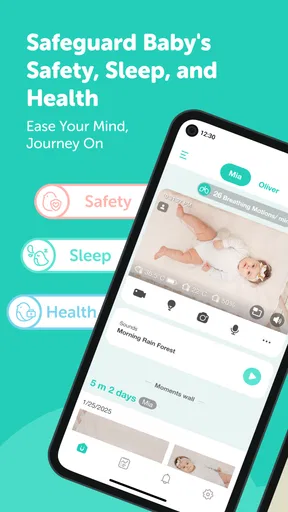
First things first, setting up the CuboAi Smart Baby Monitor is a breeze. You don’t need to be tech-savvy to get it up and running. Once you're connected, it’s like having a friendly little owl watching over your baby. The app’s design is intuitive, almost like it’s holding your hand through the process. Everything from connecting to your Wi-Fi to adjusting the camera angle is straightforward.
Crystal Clear Video Quality
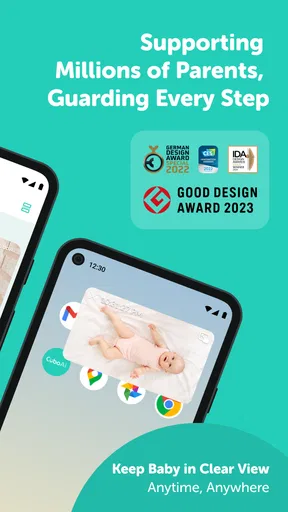
Let’s talk visuals. The video quality is absolutely stellar. Whether it’s day or night, you get a clear view of your baby’s crib. The night vision is particularly impressive, allowing you to see every sleepy yawn and stretch. It’s almost like having a personal night owl, keeping watch when you can’t.
Smart Alerts
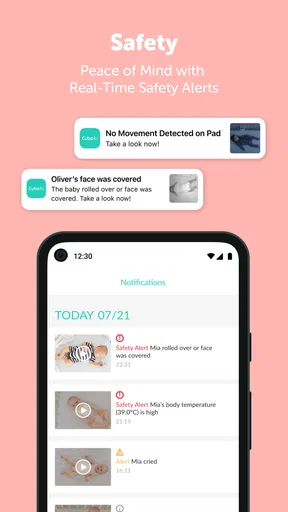
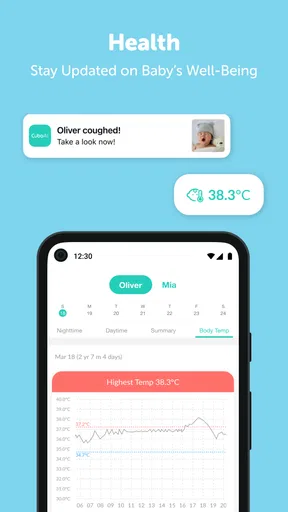
One of the coolest features is the alert system. CuboAi doesn't just notify you when your baby is crying; it goes the extra mile with smart alerts for things like face covering or when your munchkin strays from their sleeping area. It’s like having a sixth sense!
Worth Reading Before You Choose

Flipboard Shows What News Apps Must Do Beyond the Feed

Switching to Android Auto Means Rethinking Your Driving Routine

Google Calendar Makes a Crowded Week Easier to Manage

Ludo King Makes the Most of the Minutes Between Plans

Baby Panda World Brings Quick Play to Modern Phones, but Its Game Library Feels Busy

ESPN’s Live Game View Makes Following Close Games Easier
I’d treat those alerts as prompts to look at the live view, not as a replacement for checking on a child in person. A sensible first-night routine is to keep the phone nearby, confirm that notifications are enabled, and notice whether the alerts are useful in your room and sleep setup. If a notification arrives while you’re settling another child or making a bottle, the live view can help you decide whether to go in straight away. The important trade-off is that any alert system can create noise as well as reassurance, so I’d adjust my habits around what I actually find helpful rather than reacting automatically to every ping.
Turning sleep information into a routine
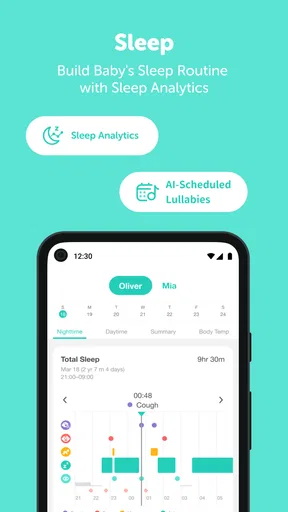
Now, if you’re the type who loves data (and let’s be honest, who doesn’t?), the sleep analytics are a game-changer. You get insights into your baby’s sleep patterns, helping you adjust routines and ensure they’re getting the best rest possible. It’s like having a mini sleep scientist in your pocket.
For me, the practical use of sleep information is noticing patterns over time, not treating one difficult night as a verdict on the whole routine. A parent might compare a calm evening with a more unsettled one and use that observation as a prompt to discuss bedtime habits with a partner. I would not use an app’s summaries as medical advice or assume that a chart explains why a baby woke. The data can support a conversation and help organize observations, but a caregiver’s judgement still matters more than a neat-looking record.
Sharing the view without losing control
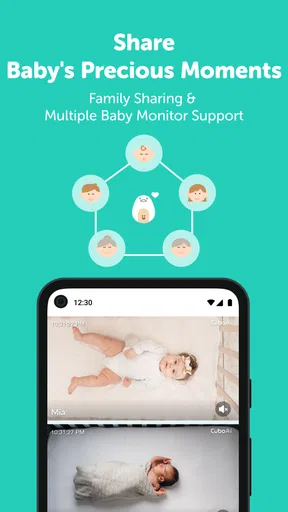
Another neat aspect is how easy it is to share access with family members. Whether it's grandparents or a partner working late, they can tune in and see their favorite little human in action. It really brings everyone together, even when they're miles apart.
Sharing is most useful when it has a clear purpose. For example, if one parent is away at bedtime, a second caregiver can check the camera rather than asking the person in the nursery to send constant updates. Before inviting relatives, I’d agree on who should receive alerts, who is simply checking in, and when access should be used. That keeps the monitor from turning into an open-ended stream of interruptions. It also makes it easier to hand care from one adult to another: the person leaving can mention what they noticed, while the next caregiver uses the app for a quick visual check.
This connected approach differs from a basic audio monitor, which is usually simpler and can be enough if all a family wants is to hear a cry. A standalone camera may offer a picture without the same emphasis on CuboAi’s alert and sleep tools. I’d choose this app-and-monitor setup when visual checks and extra monitoring information are genuinely useful; I’d choose the simpler alternative if fewer features, less account coordination, or a straightforward sound feed matters more.
Finding the useful controls quickly
What’s really refreshing is how user-friendly the interface is. You’re not going to get lost in a sea of menus. Everything is neatly organized and easy to navigate. Plus, the app’s aesthetic is just adorable. Who knew a baby monitor app could be so stylish?
In daily use, I’d make the first few checks while I’m not in a rush: open the live view, learn where the camera controls sit, and see how quickly I can reach the functions I expect to use at night. That is a small but worthwhile rehearsal. If a baby stirs while I’m half-awake, familiar controls are more helpful than a pretty layout I have only explored once. I’d also avoid changing camera positioning casually after the view is working well; a clear, consistent angle makes routine checks easier to interpret.
Privacy and trust are part of the routine
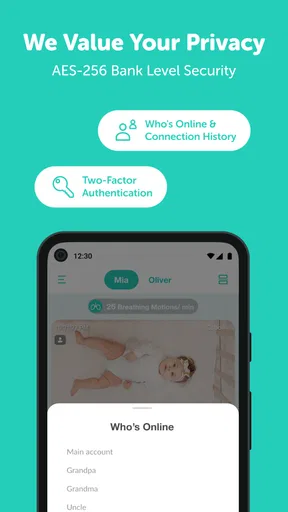
In this day and age, security is a big deal. CuboAi takes this seriously with encryption and two-factor authentication, giving you peace of mind that your data—and your baby’s privacy—are well-protected.
Even with security measures, I’d treat access as something to manage deliberately. Use two-factor authentication, keep the account limited to people who need it, and revisit sharing if a caregiver’s role changes. That is especially relevant when a monitor moves from one household routine to another, such as a grandparent helping for a few evenings. The camera is pointed at a private space, so a quick conversation about who can view it is just as important as learning the app’s controls.
Where the experience can become less reassuring
A connected monitor depends on the phone, the camera, and the home network working together. That makes it more convenient than a simple audio-only setup for some families, but it also adds more points where a check-in can feel less smooth. If the app is slow to open, a notification is missed, or a caregiver is not comfortable with accounts and settings, the extra intelligence may become extra work. I’d keep a familiar backup routine—such as listening for the baby directly and checking in person—rather than making the phone the only way to know what is happening.
The rating is low enough that I would not dismiss other parents’ frustrations, even though individual experiences vary. Before buying into a feature-heavy setup, I’d read recent reviews for issues that match my own situation, especially if dependable alerts are the main reason I’m considering it. The app has been available since September 4, 2018, and the current version is 2.22.2; that history does not remove the need to check whether the present experience suits your phone and household.
Who is likely to appreciate this setup?
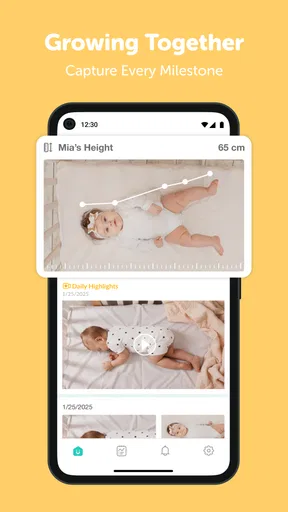
I think it fits parents who want to look in on a sleeping baby from another room, value visual checks, and expect more than sound alone. It can also suit families who share caregiving and want relatives or a partner to have a defined way to check in. If you like using observations to shape a routine, the sleep information may be a welcome extra—as long as you treat it as context, not a diagnosis or a guarantee.
I’d be more cautious if you want the cheapest, simplest monitoring arrangement, dislike app accounts, or know you will find frequent alerts stressful. It is also not the right choice if the phone or operating-system requirement is incompatible with your device. Families who need a monitor that works without relying on a connected app may be happier with a basic audio unit or another setup built around that priority. The best monitor is the one that supports the adults caring for the baby without adding more worry than it removes.
Wrapping It Up
So, what’s the final verdict? The CuboAi Smart Baby Monitor is a fantastic choice for tech-savvy parents who want to ensure their baby’s safety and capture precious moments effortlessly. It’s packed with features that are not just smart, but genuinely useful. From crystal clear video to intelligent alerts and sleep insights, it’s like having a mini-parenting assistant. If you’re ready to take your baby monitoring to the next level, CuboAi might just be the perfect fit!
My recommendation is to decide on the job you want the monitor to do before committing: a quick visual check, shared access, alert-based awareness, or a combination of these. Then test the ordinary handoff from one caregiver to another while everyone is awake, and see whether the app’s notifications and controls fit naturally into your evening. That simple trial reveals more than a feature list can. CuboAi can make remote check-ins feel reassuring, but it works best when it supports attentive caregiving rather than trying to replace it.
Pros
- High-quality HD video streaming.
- Real-time sleep analytics available.
- Temperature and humidity alerts.
- Covered face and rollover alerts.
- Easy setup and installation.
Cons
- Subscription needed for premium features.
- Can be pricey compared to competitors.
- Occasional connectivity issues.
- Limited compatibility with older devices.
- App updates may require frequent restarts.
FAQs for CuboAi Smart Baby Monitor
What features does the CuboAi Smart Baby Monitor offer?
The CuboAi Smart Baby Monitor includes advanced features such as HD video streaming, night vision, and 2-way audio. It also offers sleep analytics, danger zone alerts, and temperature/humidity monitoring. The AI technology provides personalized alerts for covered face or rollover, ensuring your baby’s safety and your peace of mind.
Is the CuboAi Smart Baby Monitor easy to set up and use?
Yes, the CuboAi Smart Baby Monitor is designed for user-friendly setup and operation. The app guides you through the installation process with clear instructions. The interface is intuitive, allowing you to easily access live video, alerts, and settings directly from your smartphone or tablet.
How reliable is the connection and video quality of the CuboAi monitor?
The CuboAi Smart Baby Monitor provides a reliable connection through Wi-Fi, offering clear HD video quality. It ensures minimal latency and smooth streaming, even in low-light conditions with its night vision feature. However, connection quality may vary depending on your internet speed and Wi-Fi signal strength.
Does the CuboAi Smart Baby Monitor respect user privacy?
The CuboAi Smart Baby Monitor prioritizes user privacy by implementing strong encryption and secure data storage. The app requires user authentication, and only authorized users can access the video feed. Additionally, data is not shared with third parties, ensuring your family's privacy is protected.
Can the CuboAi Smart Baby Monitor be used for multiple children?
Yes, the CuboAi Smart Baby Monitor can be used for multiple children. You can set up multiple cameras and monitor different rooms within the app. Each camera can be customized with specific alerts and settings, allowing you to keep an eye on all your children simultaneously.


